Mentor Intelligence

Match the right mentors to every founder team.

The operating system for venture mentor programs. Independent chapters share one platform — each keeps its own roster, intake, matching, and brand. Staff can ask the in-app assistant to run those chapter jobs without leaving the workspace.

Product

Built for mentor program operators

Every tool your operators use — intake, matching, roster coverage, directories, program health, funder reports, boards for the rest of the work and an in-app assistant — kept separate for each chapter, in one place.

Intake and matching

Dashboard & what's new

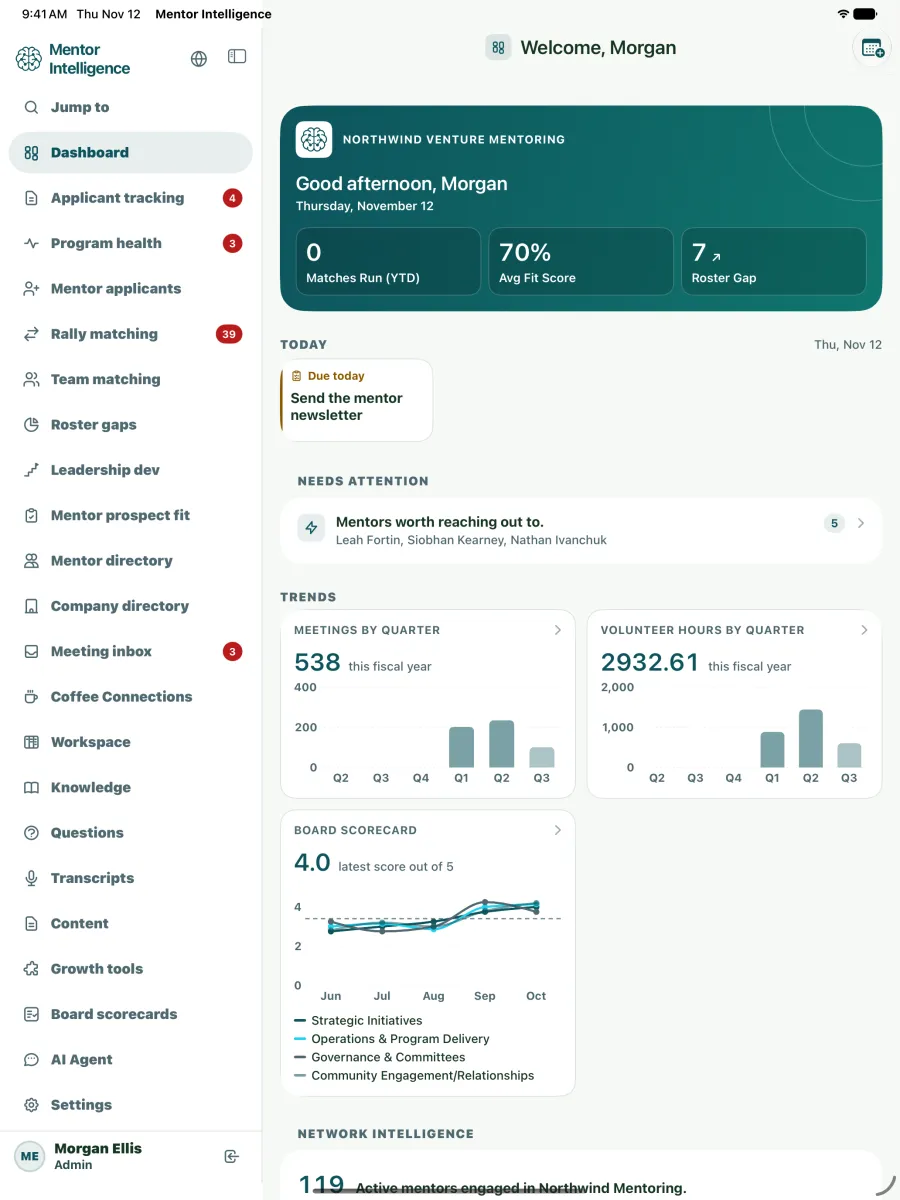
Your chapter at a glance: active mentors, matches run this year, roster gaps and open company needs.

Red badges show what is new since you last looked, and each person chooses their notices in Settings, Notifications. Email reminders are there when your chapter wants them, and stay off until you say.

Available on request, set up with us: calendar sync with Google Calendar and Outlook, and notices in Slack or Microsoft Teams.

Applicant tracking & screening

Build your application form, then review every venture in one pipeline, as a list or a board. Reviewers score on your own rubric, blind if you choose, and their scores sit side by side. Every On Hold or Not a fit carries a reason. With AI assistance on, an optional intake interview asks applicants a few more questions and drafts a needs brief for staff.

Intake pipeline
New2
Pre-Screen2
Interview1
Approved1
Screening score 4.2 · 2 reviewed

Small, invited cohorts

By invitation only Close the public form, move the companies you pick from Identified to Contacted, Offered, Accepted and In program, and see "7 of 10 places filled".

Don't count hours For a volunteer program, nothing asks for or shows mentor hours, and meetings and check-ins carry on.

Starter boards Workspace boards for session travel and hotels and for company and mentor outreach, with costs and nights totalled.

Sample data first Try it on sample data, then we clear it, keeping your settings and branding, and you go live the same day.

Rally matching & public sign-up

Mentors sign up from a link with their capacity and the ventures they rank. The app then drafts the teams and shows why each mentor was matched. Confirmed teams get intro emails ready to copy and an attendance list for the day.

Team matching & match scorecards

Suggests mentors for a venture from the needs in its pitch, with a Why list under each one. A match scorecard and a track record of past matches show how teams are doing. It suggests; staff decide every match.

Need-based search
Draft teamAI shortlist · pitch brief ready
Amara Walker · Growth · B2BWhy: Led go-to-market for a B2B product
Morgan Chen · Product · AIWhy: Took an AI product to its first customers
Jamie Rivera · Finance · SaaSWhy: Built unit economics for SaaS
Sam Kim · Ops · MarketplaceWhy: Ran marketplace operations, with room for a team

Mentors and the board

Roster gaps & recruiting plan

See the experience your mentor bench is short of, against the targets you set. It also shows who is available now and gives you a recruiting plan.

Board scorecards & board meetings

Your board's view of the program, month by month: ratings, effort and notes on every part of it. Build board meeting agendas, and download scorecards and agendas as PDFs. The board members you add see the scorecard too.

Mentor prospect fit

Rates a prospective mentor as a Strong, Potential or No match for your program, with a brief for your board. It also searches public records and news, and shows the source of each result. It informs your decision and is not a background check.

Mentor directory & mentor applicants

Search your mentor roster and review the profile updates mentors send in. Follow each prospective mentor from referral to fully onboarded, starting with a public Become a mentor form.

Resources library

The resources library keeps the handbook, guides and templates you share with mentors, as links and files by category. Mentors see what is for them, with a New marker on what was added since they last looked. Staff-only items stay with staff, and files open through short-lived links.

Office hours

Mentors post office hours on a topic, in person or by video call. Ventures book a slot through their own link, or staff book it for them. A held slot counts the mentor's hours on the ledger once, never twice.

Office hours
Go-to-marketAmara Walker · Thursday
2:30Booked
  • Bright Harbor · 2:30Held · 0.5 hours
A booking link for each ventureHours counted once

Ventures and program health

Company directory & impact journey

Every program venture and alumni company has its mentor team, goals, a readiness rating and a flag when the team has gone quiet. A timeline shows its milestones and Growth story. Check-ins ask about jobs and funding, and reports never show a group under five.

Founder sign-in & My venture

Founders you invite sign in to My venture. They see only their own venture: its profile and goals, its mentor team, meetings and agendas, and check-ins. A founder is never a member of your chapter, so nothing else is open to them.

Program health & hours ledger

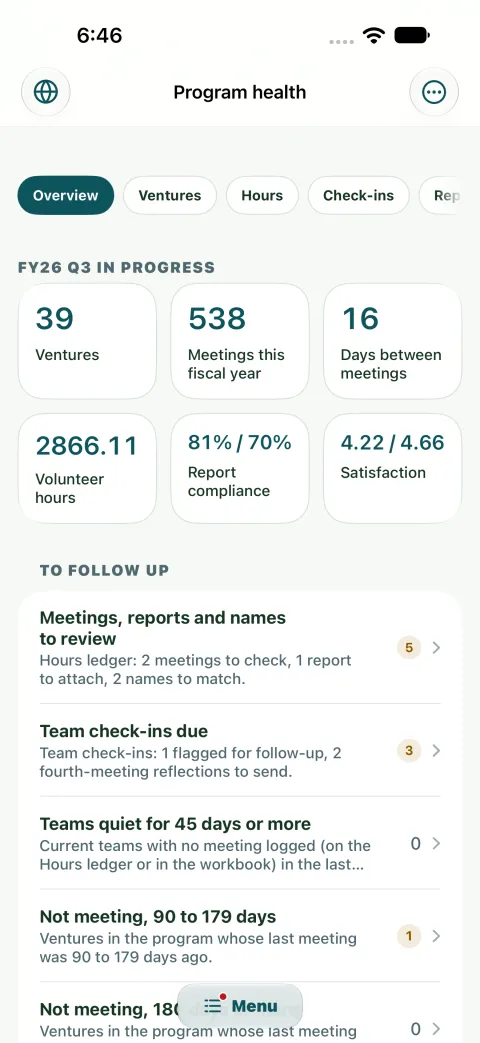
One overview of ventures, meetings, quiet teams and survey results, with quarterly, events and sponsor referral reports. The hours ledger takes mentor meetings and volunteer hours from a calendar export, a quick add or a team's log link. Find a time books each team meeting, with a video link if you want one. A yearly check-in asks each company about jobs, revenue, funding raised and whether mentoring helped.

Session paperwork

Before a booked team meeting, each founder is asked for an agenda. After it, the lead mentor writes a report and the founders add their notes and rate the session. A meeting missing its paperwork is flagged Needs attention. Mentor feedback is shown only from five answers.

Session paperwork
  1. Agenda in
  2. Held
  3. Report in
  • Northwind Labs · agendaIn before the meeting
  • Cedar Peak · held, no report yet
Founders' notes and a 1 to 5 ratingFeedback from 5 answers

Program sessions

Run a few program-wide sessions a year, in person or virtual, where every company meets its mentor team in a scheduled slot. Fill the slots back to back, see a warning when a mentor or a room is booked twice, and publish every team's meeting in one step. The company sends its agenda before, and the company, the lead mentor or both write the summary after, each through their own link with no account. Print the day's schedule, or record a session that already happened.

Volunteers

Post volunteer shifts for mentors to sign up to, with a waitlist. Tick who came or show a check-in code, and confirmed hours land in each mentor's record. Mentors sign your agreements in the app, and one list shows who is overdue.

Volunteer shifts
  • Rally host · Saturday3 of 4 spots
  • Room check-in code2 to confirm
  • Morgan Chen · 50 hoursMilestone
Statement PDFAgreement signed · version 2

Community and reporting

Venture review & check-in rounds

Gives each venture an annual review month. Founder check-in rounds run quarterly or yearly, and you see who has answered.

Meeting inbox

Meeting notes that could not be filed wait here for staff, who can also paste a transcript in themselves. With AI assistance on, draft a recap with the summary, decisions and next steps. Nothing is saved until staff confirm.

Coffee Connections and Community

Mentors sign up for each round and are put in trios on shared answers, with no repeat pairs. Each trio picks times on a personal link, and the app books a place to meet. In Community, staff post announcements and keep a perks list, with discussions if your chapter wants them.

Leadership development

Once a year, founders share their leadership challenges through a personal link. Staff use the answers in matching and see trends against mentor coverage. Mentor development sessions and a yearly self-assessment are logged here too. After a session, mentors can keep private coaching notes, drafted by AI when AI assistance is on.

Workspace boards

Boards for intakes, partners and internal tasks, as a table, a board or a calendar. Add an item in one line, @mention people, set automations and see My work. Start from a Monday.com export if you have one. Program rules your Admin sets turn an event, such as a team gone quiet, into a notice, a task or an email.

Funder reports & venture groups

Funder report Pick a funder template and a period, and download the report as a PDF or CSV.

Demographics, with consent Two optional questions, off until your chapter turns them on and reported only as totals.

Venture groups Tag ventures into a group, such as Fall 2026, and filter intake, rallies, Program health and the funder report by it.

Annual report A yearly page and PDF from your records: jobs, revenue and funding raised, whether mentoring helped, and quotes companies cleared to share.

Platform and trust

Networks of chapters

When several chapters belong to one network, the network sees them together: counts, what needs attention and the funder report rolled up. Network members never see a chapter's own records.

A chapter can ask the network for a mentor, and no mentor record crosses. A venture is referred to another chapter only after the founder sees what would be shared and agrees.

AI assistant for chapter jobs

Ask the in-app assistant to do a chapter job: it lists the steps and waits for your Confirm. It also drafts pitch needs, prospect briefs and meeting summaries. Your chapter's Admin can switch AI off, and then nothing from your chapter is sent to an AI provider. Staff decide every match.

Ask this chapter
This chapter
  • Pipeline12 in review · 4 stalled
  • Confirmed teamsNorthwind · 3 mentors
  • Deletes ask for the nameTyped to confirm
The steps
  1. Move Cedar Peak from Pre-Screen to Interview
  2. Note the move on its timeline
Nothing changes until you confirm
The steps
  1. Read the needs in Northwind's pitch
  2. Suggest three mentors, each with a Why
Nothing changes until you confirm
The steps
  1. Find applicants with no change in 14 days
  2. List the 4 that are stalled
Nothing changes until you confirm

Your chapter, kept separate

Row level security in the database keeps each chapter's records to that chapter's own staff, and Admin, Staff and Viewer roles set who can change them. The database and sign-in are hosted in Canada Central, the stored data is encrypted, and connections use HTTPS.

Move in from your spreadsheets or another tool's export, and see what will change before anything is saved. Each chapter sets its own colours, logo and page background, and once its Admin allows it, a Language control shows the interface in another language through Google Translate.

Sign-in and security reviews

Staff sign in with Google, Apple, Microsoft or email and password. Each chapter sets which email domains and addresses may sign in, and its Admin can require two-step sign-in for Admins. Single sign-on through your own identity provider: ask us.

Security reviews of the app, its database and its public pages were done in October and November 2026.

Apps and devices

Mentor Intelligence works in the browser on phones, tablets and desktops, and a Mac or any other computer can install it from the browser as an app. The app for iPhone, iPad and Apple Vision Pro is in the App Store, and the desktop app for Windows and Linux downloads from GitHub. Apps for Android and foldables are in testing now, coming to Google Play.

When a chapter turns on push notifications, the apps show the section and a count, never a name.

Missing something?

Let us know, and we're happy to custom build it for you.

We build new features together with the programs that use Mentor Intelligence.

Download

Get the apps

The same chapter workspace on your phone, tablet and desktop.

The iPad app: the dashboard, with the sidebar of sections and the trends by quarter.
iPad
The iPhone app: Program health, with the overview figures and what to follow up.
iPhone
  • Apple

    • iPhone, iPad and Apple Vision ProNative app in the App Store (Apple Watch too)
  • Android

    Phones, tablets and foldables, coming to Google Play (Wear OS watch too)

    In testing
  • Desktop

    On a Mac, use Mentor Intelligence in the browser, or install it from the browser as an app.

    The Windows and Linux installers are not signed yet, so Windows may say the publisher is unknown before it installs.

Next step

See Mentor Intelligence on your chapter.

Walk through matching, roster coverage, and intake with your program in mind — each chapter stays on its own data.